

top of page

How to Choose the Best Night Vision Goggles

Choosing Night Vision Goggles is less about chasing the biggest number on a product page and more about matching the device to real conditions. A quiet backyard, a wooded trail, and a dark campsite place different demands on visibility, range, comfort, and battery life. Even a bright display can disappoint if its field of view feels narrow or its controls are hard to use with gloves.

Dr. Eric Fossum, a pioneer in CMOS image-sensor technology, offers relevant expertise in how sensors capture images in low light. The following is an editorial paraphrase of that technical lesson, not a verbatim quotation: “In low light, sensor performance and usable detail matter more than impressive claims alone.” That distinction helps buyers compare digital models with image-intensifier designs, while remembering that thermal devices detect heat rather than amplify visible light. Check the specifications, but also consider how the picture looks in realistic darkness.

Small details count. Can you adjust focus quickly? Does the unit sit comfortably after ten minutes? How long does it run, and does it need an infrared illuminator in very dark settings? Read the manual and verify the manufacturer’s stated range and operating limits. A higher price is not automatic proof of a better fit. Nor is a single advertised range enough. Your own use matters.

This guide explains the main features, trade-offs, and questions worth asking before you buy. Some comparisons remain imperfect because testing conditions vary. That deserves a second look.
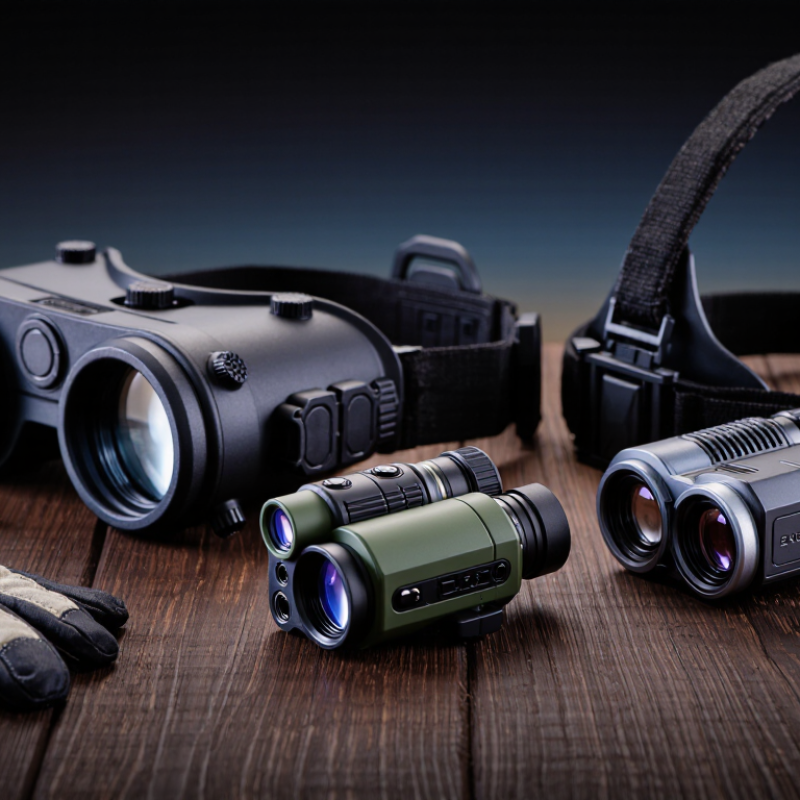
How to Choose the Best Night Vision Goggles

Identify Your Intended Use and Viewing Conditions

Start with the task, not the advertised range. For checking a dark backyard, compact goggles may be easier to carry than a heavier unit. For wildlife observation from a stationary position, comfort and steady viewing may matter more. Think about how long you will wear them, whether you need both hands free, and how far away your usual subject is. Details matter.

Light conditions change what you need. Night-vision devices generally amplify available light, so performance can vary under a cloudy sky, beneath trees, or near artificial lighting. If you expect very little ambient light, check whether the device includes infrared illumination and how that affects its usable distance. Test the controls in a dim room, too; small buttons can be frustrating with gloves. I would not assume a larger magnification is automatically better. It can narrow the view and make movement harder to follow.

Consider weather, viewing distance, and your surroundings before choosing. Fog, rain, and branches can obscure detail, regardless of the specifications. A wide field of view can help when scanning a trail, while image clarity may matter more for observing a fixed point. If possible, try the goggles in conditions similar to your intended use. A brief indoor test is not enough. My own assumptions about “typical” darkness may not match your setting, so compare real-world performance claims carefully and prioritize clear, independently verifiable specifications.

Compare Night Vision Generations and Imaging Technologies

Night vision generations describe image-intensifier technology, not a simple guarantee of performance. Generation 1 devices are often more affordable, but may show grainier images and need more ambient light. Generation 2 typically offers clearer detail in darker conditions. Generation 3 can provide stronger sensitivity, though performance and cost vary by model and local availability. Darkness varies. Check the actual specifications, warranty, and intended use rather than relying on a generation label alone.

Also compare image intensifiers with digital night vision and thermal imaging. Intensifiers amplify available light, so moonlight, clouds, and nearby lighting can change what you see. Digital systems use a sensor and may display or record images; some need an infrared illuminator, which can affect battery life. Thermal imaging detects heat differences, not visible detail, and may help locate a warm animal against cool grass. It can be less useful for recognizing small identifying features. Try each type in conditions close to your typical environment.

Tips: Look through the device at dusk and in near-darkness. Check eye comfort, field of view, focus controls, weight, and battery access. Ask whether the stated range assumes an illuminator. A crisp showroom image may not reflect real use; I would not choose from a specification sheet alone.

Evaluate Image Quality, Range, and Essential Specifications

A clear image is not just a bright image. Check resolution, contrast, and signal-to-noise performance, since grain can hide edges and facial details. EMVA 1288 Release 4.0 provides a camera-measurement framework covering sensitivity, temporal dark noise, and dynamic range. These figures help compare digital sensors, but they do not describe every image-intensifier system. Compare like with like. The CIE 191:2010 mesopic model covers scene luminances from 0.005 to 5 cd/m², a useful reminder that low-light conditions vary widely. That range is not a device rating.

Treat advertised range with care. Detection, recognition, and identification are different tasks; a distant shape may be visible without its features being clear. Ask what target size and ambient light were used for any stated range, and consider fog, foliage, and nearby glare. Then check field of view, magnification, lens aperture, focus adjustment, weight, and battery runtime. A wider view can make scanning easier, while higher magnification may narrow the scene and amplify hand movement. Digital models also need a usable refresh rate and display. I would not choose by one headline number alone; it is an easy mistake. Compare specifications under matching test conditions, then assess comfort during a realistic, safe trial.

Check Comfort, Durability, Battery Life, and Compatibility

Comfort matters during a long, still watch. Try the goggles with your usual headwear, then look down and turn your head. Notice pressure on your nose, strap slippage, and whether the controls remain easy to reach with gloves. Fit matters. A lighter device may feel better, but balance matters too; front-heavy goggles can strain your neck. I would not judge comfort from weight alone.

Check durability claims against clear test criteria. IEC 60529 defines IPX4 as protection against water splashes and IPX7 as protection during temporary immersion up to 1 meter for 30 minutes. These ratings do not prove resistance to every impact or temperature change. MIL-STD-810H also describes environmental test methods, but passing one method does not guarantee every unit survives every field condition. Read the exact test details. A vague “rugged” label tells you little.

Battery life should match your actual outings, not just a best-case figure. Compare stated runtimes at the same settings, and check whether cold-weather use reduces performance. Carrying a spare battery adds weight, but running out in the dark is worse. Compatibility needs the same close check: confirm that the goggles fit your helmet or head mount, clear your eyewear, and work with the intended power source. Measure before buying. Tiny fit differences can become annoying fast.

How to Choose the Best Night Vision Goggles

Check comfort, durability, battery life, and compatibility. Battery format and voltage are key compatibility checks.

Common nominal voltages: alkaline AA and AAA batteries are 1.5 V, CR123A batteries are 3 V, and 18650 lithium-ion cells are typically rated at 3.6–3.7 V. Voltage alone does not confirm compatibility—check the device specifications for approved battery types and polarity.

Review Legal Requirements, Warranty, and Total Cost of Ownership

When comparing night vision goggles, check local rules on ownership, use, and cross-border transport before paying. Requirements differ by location and device type. Save the seller’s written specifications and warranty; a verbal promise is difficult to verify later. Small print matters. Look for exclusions covering batteries, moisture, impact damage, calibration, and labor. The European Commission’s Your Europe consumer-rights guidance states that goods bought from traders in the EU carry at least a two-year legal guarantee. This is an EU benchmark, not a worldwide rule.

Calculate ownership cost over three years, not just the checkout price. Add batteries, compatible mounts, a protective case, shipping, taxes, and likely service charges. Compare quoted runtime with your expected hours of use; frequent battery replacement can quietly raise costs. Ask whether repairs require shipping the unit away, and request estimated turnaround time and fees in writing. A low purchase price may still suit occasional use, but it can be poor value if essential accessories are extra. These estimates are imperfect; usage and repair needs vary.

Tips: Photograph the warranty and receipt. Keep a simple cost log. Before buying, ask for the exact warranty term, repair process, and any restocking fee.

How to Choose the Best Night Vision Goggles - Review Legal Requirements, Warranty, and Total Cost of Ownership
Decision Area What to Compare Practical Checks Impact on Total Cost and Choice
Intended Use Scouting, property observation, navigation, wildlife viewing, or professional use. List the usual viewing distance, lighting conditions, weather exposure, and whether hands-free use is essential. Choose features for the actual task; unnecessary magnification or accessories can add cost and weight without improving usability.
Device Technology Image-intensifier goggles, digital night-vision viewers, or thermal imaging equipment. Compare performance in low light, operation with or without ambient light, image detail, display characteristics, and compatibility with any required head mount. Technology affects purchase price, battery use, accessory needs, and suitability. Compare specifications under similar test conditions rather than relying on category labels alone.
Legal Requirements Local laws governing possession, use, hunting, wildlife observation, and use on public or private property. Check the rules for the specific location and activity with the relevant government or wildlife authority. Obtain permission before observing on private property. Rules vary by jurisdiction and intended activity. Do not assume that owning a device makes every use lawful; confirm requirements before purchase or use.
Export and Travel Export controls, destination-country rules, and restrictions on carrying equipment across borders. Ask the seller or manufacturer for the device’s export classification and verify applicable rules for the origin, destination, and travel route. Some night-vision equipment may be subject to export controls. A device’s classification and the rules that apply depend on the equipment and circumstances.
Warranty Coverage Warranty duration, covered components, repair or replacement process, and geographic coverage. Read the written warranty for exclusions such as accidental damage, unauthorized repairs, water exposure, battery leakage, or commercial use. There is no single warranty period that applies to all night-vision devices. A shorter or limited warranty may increase expected repair or replacement costs.
Durability and Service Weather and impact resistance, availability of authorized service, repair turnaround, and replacement-part access. Confirm that any advertised protection rating applies to the complete device and check the maker’s care and operating instructions. Repairability and parts availability can matter more over time than a small difference in initial price. Do not treat a protection rating as proof of warranty coverage.
Power and Accessories Battery type, battery life under stated conditions, charger requirements, mounts, protective case, and illuminator compatibility. Check whether included accessories meet your needs and whether batteries or mounts are standard, replaceable, and readily available. Include recurring batteries and necessary accessories in the ownership budget. Battery-life figures can vary with temperature, settings, and usage.
Total Cost of Ownership Purchase price, taxes, shipping, essential accessories, batteries, maintenance, repairs, and eventual resale value. Use the same ownership period and usage assumptions when comparing quotations. Record which items are included and which are optional. Estimated TCO = purchase price + taxes and shipping + essential accessories + batteries + maintenance and repairs − expected resale value. Use current quotes rather than assuming one price applies to every model.
Final Purchase Check Fit, comfort, controls, image quality, written specifications, return policy, and seller support. Try the device with its intended mount if possible, inspect the full package contents, and keep the receipt, serial number, and warranty documents. Choose the option that meets legal and practical needs at an acceptable ownership cost—not simply the one with the lowest advertised price.

Note: Legal requirements, warranty terms, and product specifications vary. Verify current rules with the appropriate authorities and confirm all coverage details in the written warranty before buying.

bottom of page